
THE PROBLEM
Our team was tasked with identifying an opportunity for voice technology on college campuses and designing an experience to fulfill it.
THE SOLUTION
Our product, the Lab-Assisting Responsive Voice Integrated System (LARVIS) is a laboratory assistant and information management system for both educational and research lab contexts. LARVIS can organize a user’s lab-related files, read and transcribe notes, explain equipment and safety protocols, communicate with lab instructors, and more.

LARVIS streamlines the lab experience by addressing its current frustrations while maintaining its educational and exploratory goals.
MY ROLE
I conducted interviews and contextual inquiries, and put together the affinity diagram and personas. I also designed the visual interface aspect of LARVIS, lead the heuristic evaluation, and implemented revisions to our design.
TOOLS
Axure RP (Prototype), Bluejeans (Socially-Distanced Testing)
TEAM
Anton Gudiswitz (co-designer/researcher), Joshua Redding (co-researcher, synthetic voice technician)
FRAMING
The first step in designing an experience was to identify and frame a voice experience for people on college campuses. This framing served as a way to think about and evaluate possible design ideas for the experience to come.
WHY LABS?
Initially we identified three general situations in which a voice-user interface (VUI) would not only be desirable but also exceed the usability of visual or touch based interfaces:
THREE VUI SCENARIOS
- When hands are occupied or unusable
- When the user’s visual focus cannot be distracted
- When the user has a quick question and needs an immediate response
We found that all three of these situations frequently occur in a laboratory setting, so we focused on developing a VUI system that would augment the lab experience.
CONTEXTUAL INQUIRY
To understand the workings of a lab environment we conducted interviews with:
- 3 undergraduate researchers
- 2 lab teaching assistants
- 10 upperclassmen lab students
- 2 freshman lab students
Questions touched on topics such as prior tech and lab experience, common actions in a lab, and lab frustrations. Additionally, we observed an upperclassman biochemistry lab during experimentation.
DATA CONSOLIDATION
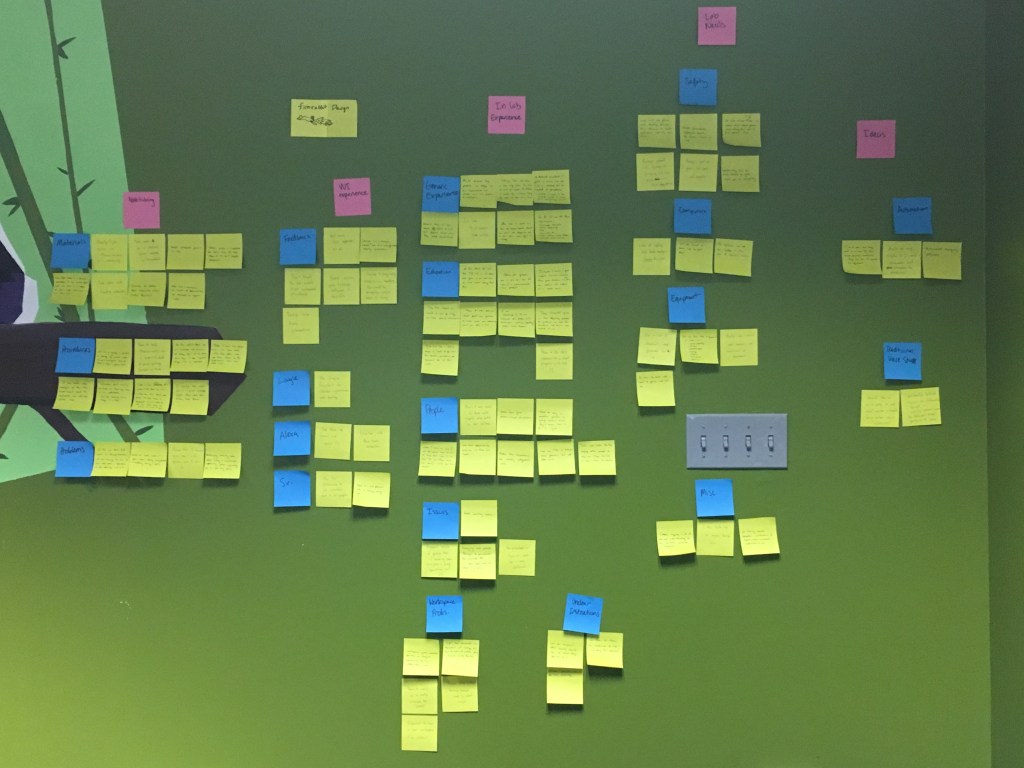
From our interview notes, our group came back together and compiled all our insights in an affinity diagram.
PERSONAS
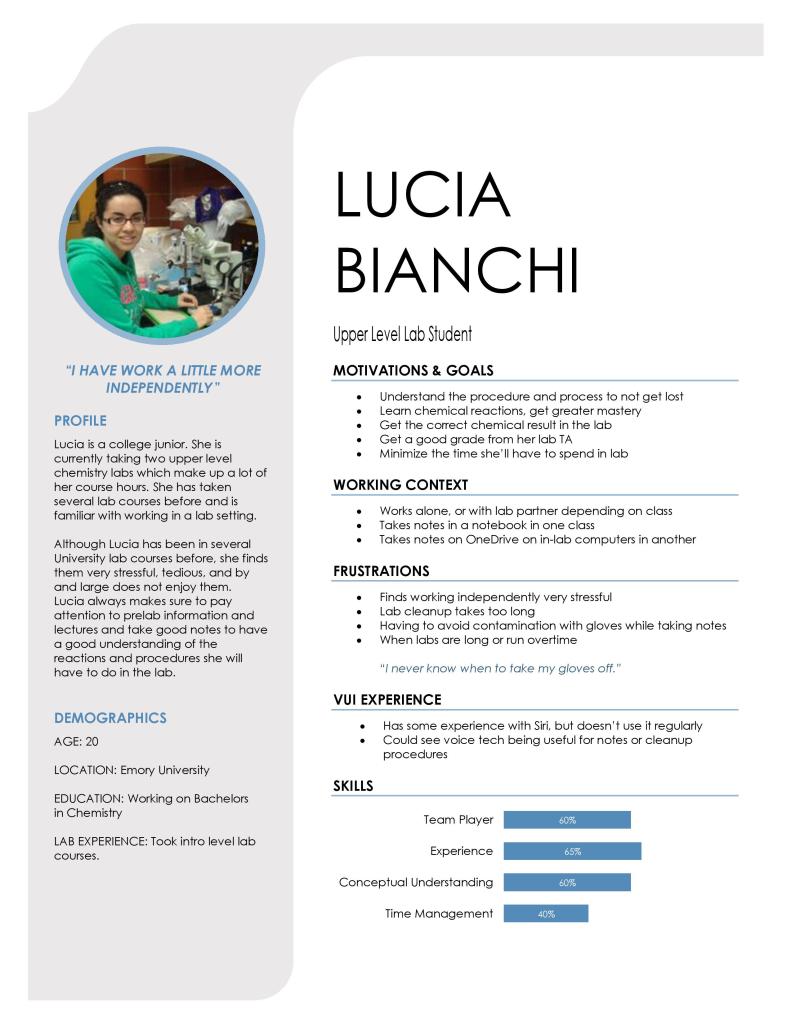
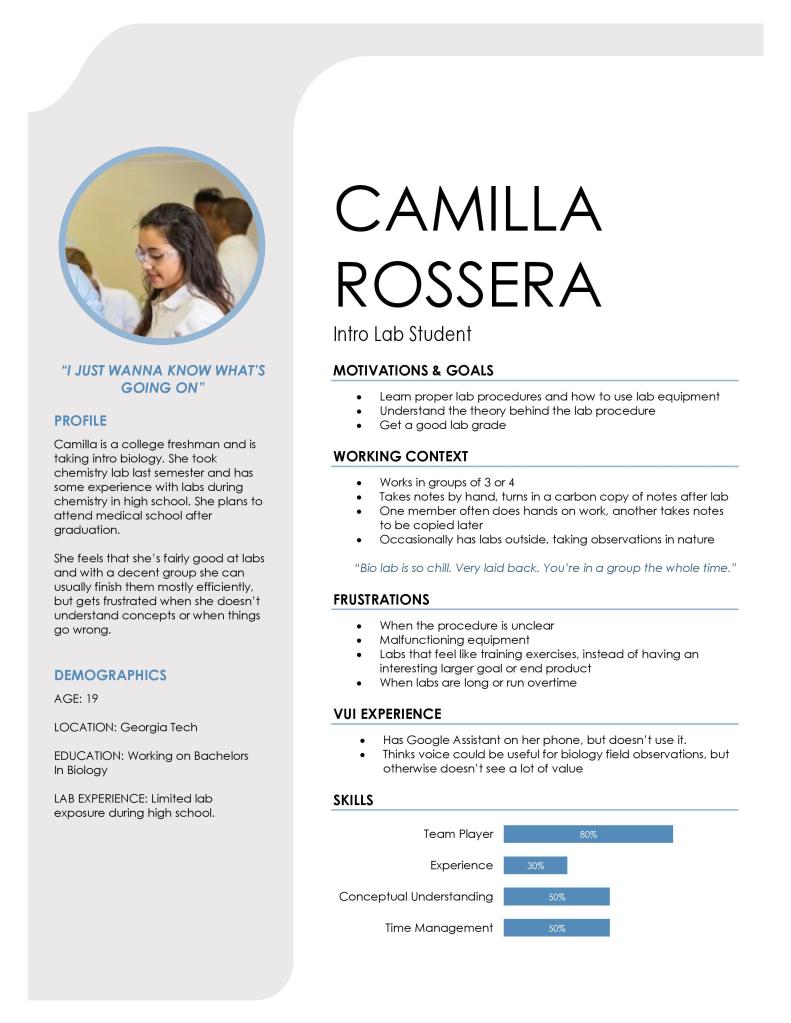
We created 4 personas that represented our core demographic. This is compromised of a Teaching Assistant, Lab Worker, Intro Level Lab Student, and an Advanced Lab Student.


IDENTITY MODEL
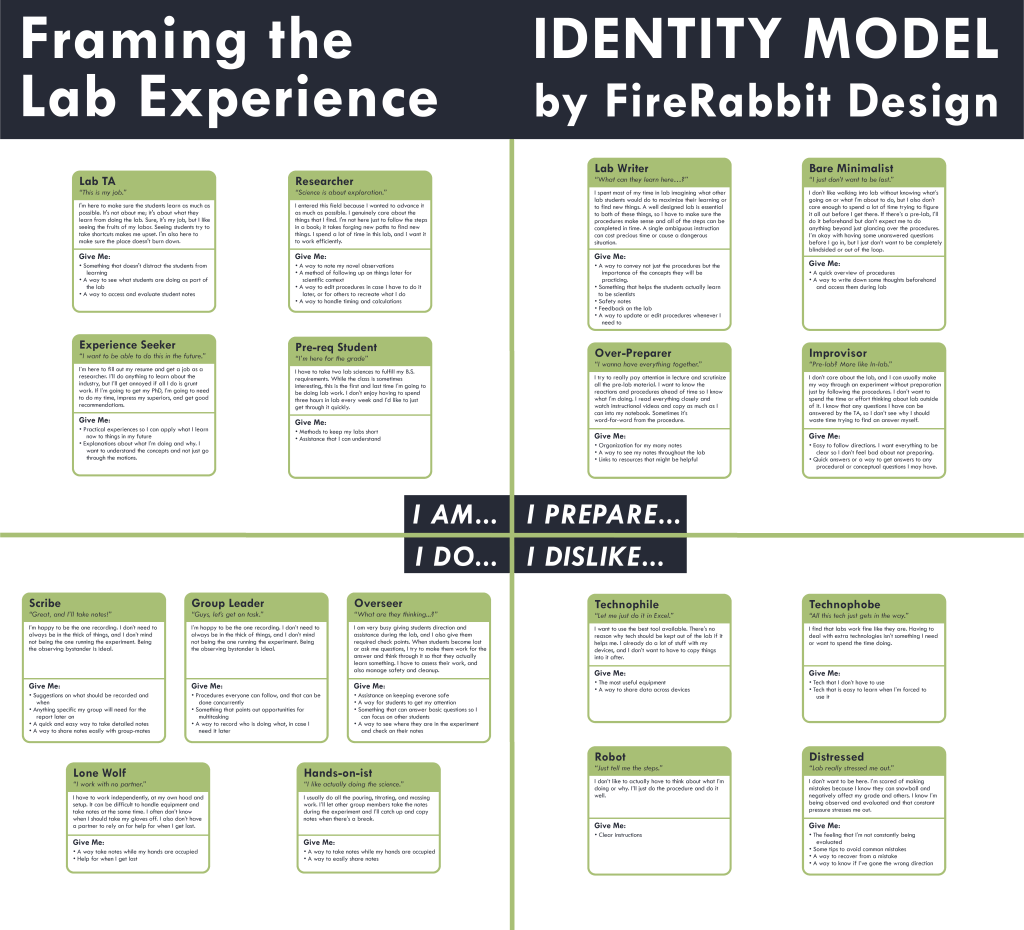
Next we took the data from our interviews and grouped different kinds of people based on their habits, preferences, and desires. Each entry is given a descriptive name, catchphrase, and their needs written from their personal perspective to humanize the user. Although these entries are much less in-depth than our personas, it helps to capture a fuller breadth of users.
FILTERING
The next step in our design process was identifying the the qualities of the experience we wanted to offer within the context of the current lab landscape. Filtering these ideas and features led into the design of the initial prototype.
SYSTEM PERSONA
Since LARVIS has a heavy voice component, it was vital that we have a shared understanding of the system persona. In order to match the context of a lab, we decided to make LARVIS a friendly, approachable lab helper. LARVIS had to sound credible and smart, but also gentile and non-condescending to avoid adding stress to already stressful lab situations.

How Can I Help You?
- Friendly lab helper, there to guide and assist you
- Professional and knowledgeable, but also considerate and gentle
- Never condescends or causes you to feel stressed
TRAITS
- Educated
- Credible
- Charismatic
- Relatable
- Knowledgeable
- Considerate
- Non-intimidating
VOICE
- Synthesized for flexibility and customization
- Enthusiastic, but no to the point of being overbearing
- Calm and worry-free
LARVIS TONE PROFILE

VOICE INTERFACE
LAB PROCESS
- Can narrate steps of the lab
- Can organize documents needed for the lab
NOTES
- Can record, transcribe, and play back notes
- Can share notes and enable collaboration with group mates
UTILITIES
- Can label and handle multiple simultaneous timers
- Calculator, stopwatch, and counter
INSTRUCTOR SERVICES
- Can add user to TA question queue
- Can submit notes to Instructor at the end of the presentation
GUIDANCE
- Can list steps for general procedures, such as sterilization and titration
- Can explain instrument usage
SAFETY
- Instructs people in the event of an emergency
- Notifies TA/Instructor of any reported emergencies immediately
VISUAL INTERFACE
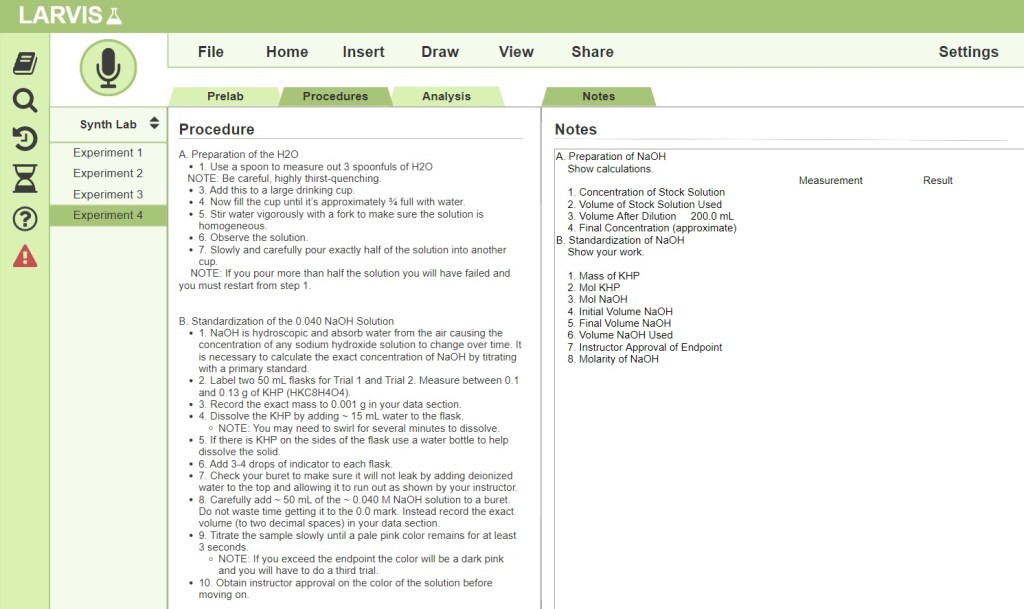
The visual interface for LARVIS is similar to common word processors and note-taking software. This design allows for easier on-boarding and greater intuitive use, since users can navigate the software with their pre-existing schema. The software also fully supports keyboard and mouse use so the user doesn’t have to completely rely on voice.
SCENARIO
Our team created a number of scenarios based on the experiences described during our research. We then condensed these scenarios into one that captures the core of the LARVIS experience.


EVALUATING
After designing the initial version of LARVIS, we proceeded to the testing stage of the process. This allowed us to identify any weaknesses or overlooked aspects in the design, and then revise the LARVIS experience to best meet the needs of our demographic.
WORKING PROTOTYPE
In order to test LARVIS our team conducted remote evaluations utilizing the Wizard of Oz testing method. Unfortunately, the COVID-19 pandemic prevented any in-person assessments. Two members of our team operated the prototype: one operating visual elements while the other played synthesized voice responses.
HEURISTIC EVALUATION
Evaluators connected to a BlueJeans call where the GUI was displayed to them via screen sharing. The evaluator was instructed to set up the call so that the interface filled their entire monitor to replicate how the final desktop version would be viewed. Evaluators were told that they could only use voice to interact with the system to mimic the “gloved” experience. They completed a mock experiment to replicate a realistic use case. This afforded the added benefit of being able to complete a Wizard of Oz prototyping system remotely.
They evaluated the prototype using Nielsen’s 10 Usability heuristics, as well as 2 customized to the project:
“Don’t teach commands; speaking is intuitive”
“Assist and expedite existing tasks; don’t add to them”.
RESULTS
Feedback we recieved from the evaluators indicated some issues with the design:
- Lack of on boarding experience or LARVIS suggestions led to it being hard to tell what could be said
- No feedback when a voice command failed
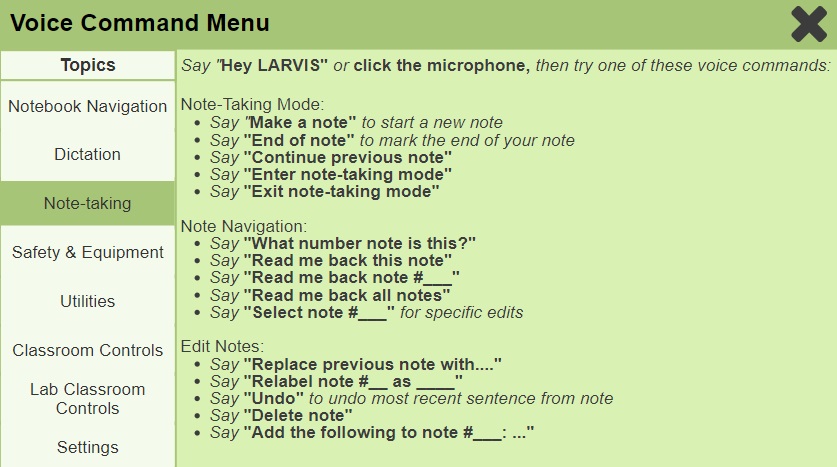
- “What Can I Say?” menu is overwhelming because it tries to cover a lot of different material at once
- Not always clear what LARVIS’ status is when active
- No clear exits or ways to undo states via voice command
- No supplementary visuals when LARVIS is responding or explaining
FINAL DESIGN
REVISIONS
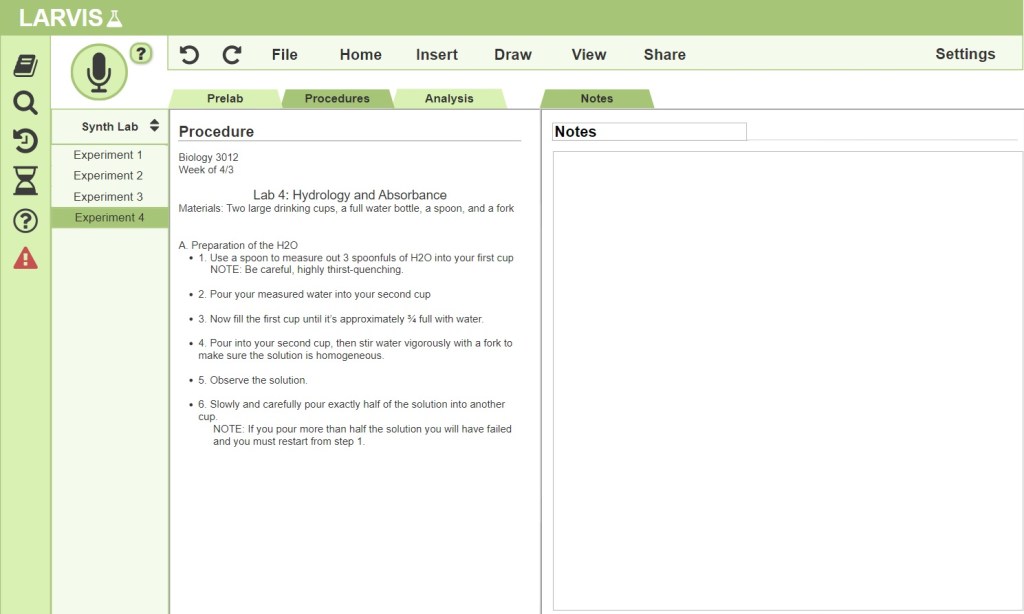
After the feedback we got from evaluators, we made some revisions to our design and implemented some new features to rectify the issues that came up.
- More comprehensive command menu
- Undo and redo buttons & voice command
- More thorough note-taking commands
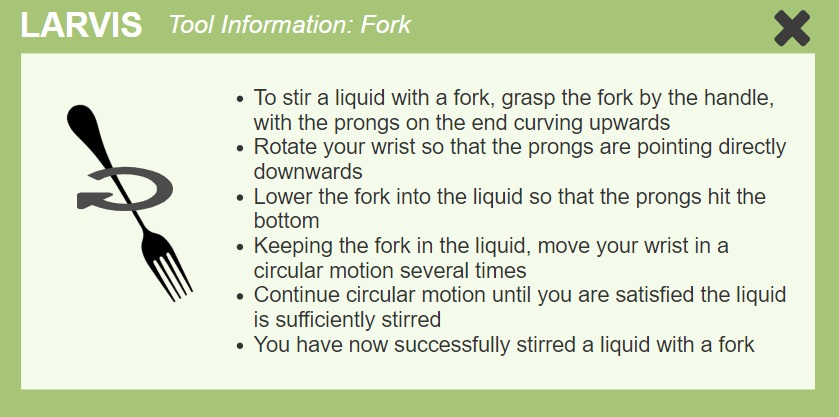
- Corresponding visual aid when LARVIS responds with information
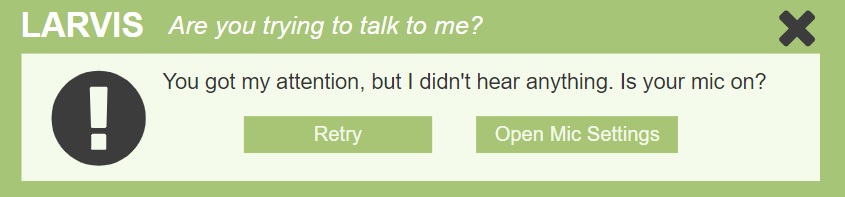
- LARVIS responds with error information or suggests the “What Can I Say?” menu
 PaulaTW
